
How to Double Your Paid Subscriber Growth (Without Constant Promotions)
You don't have to be a salesy marketer to get more paid subscribers. Here's how.

🔴 2026 is YOUR breakthrough year on Substack.
We’re hosting a free live Masterclass next week to help you FINALLY grow your audience and income on Substack — even if everything you've tried so far hasn't worked.
If you’ve ever felt a knot in your stomach at the thought of promoting your paid tier, you’re not alone.
Most creators got onto Substack because they love creating content — not because they wanted to become a salesperson.
So, they never really mention their paid tier. They avoid promoting it. They feel uncomfortable every time they think about asking people to upgrade.
And as a result, they’re leaving a huge amount of potential revenue on the table.
If that sounds familiar, this article is for you.
Because the truth is, you don’t have to be aggressive or pushy to grow your paid subscriber base.
At Write • Build • Scale, we’ve reached 1,500+ paid subscribers, and we’re adding around 100 new paying members every single month.
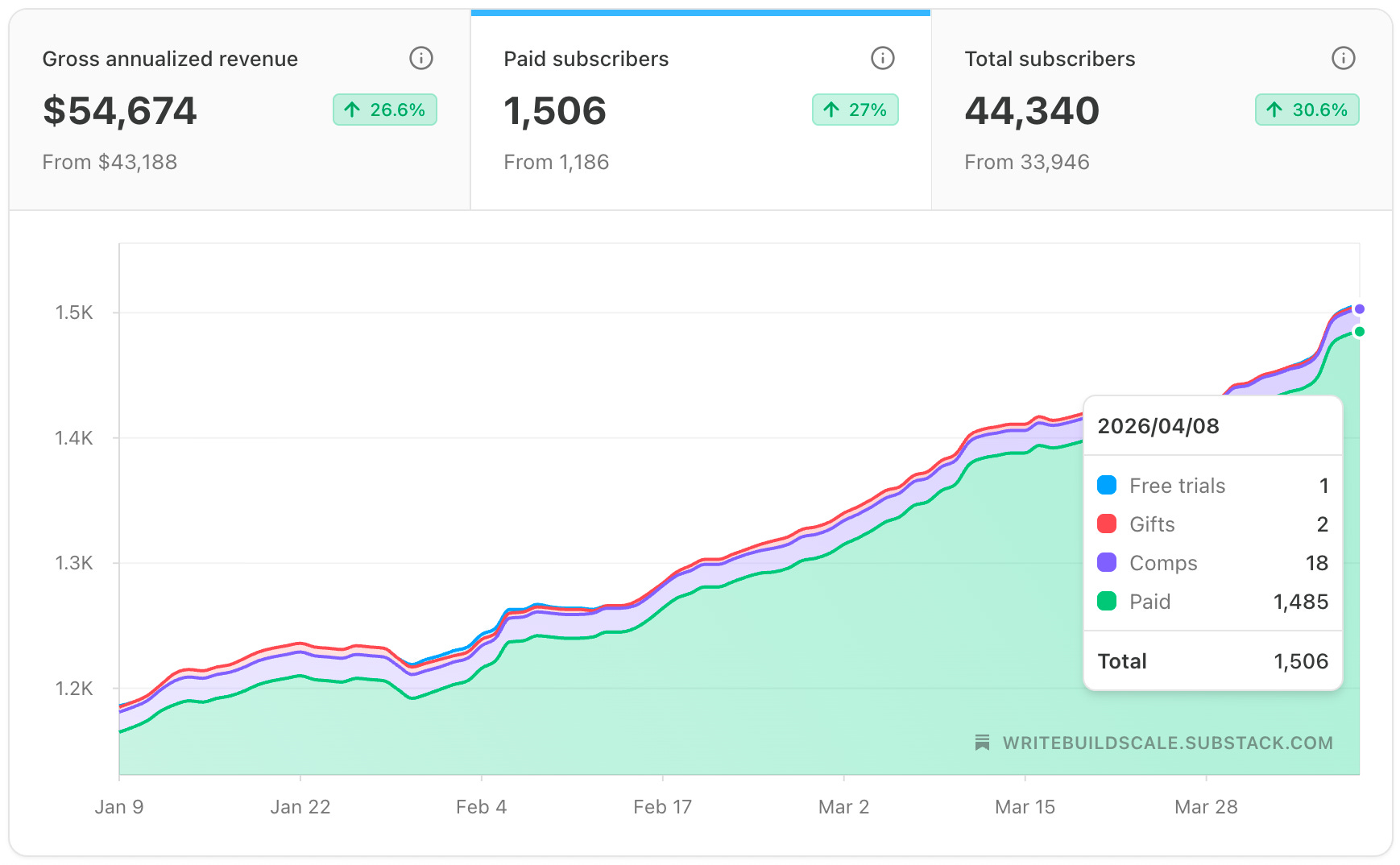
Many of these paid subscribers upgraded organically because we’ve set up a handful of conversion strategies that feel much more natural (rather than promotional).
Here are the three ‘non-salesy’ monetization strategies that made the biggest difference for us.
#1: Build a “Become a Member” Page
The first shift that changed everything for us was a mindset one: we started thinking of our premium Substack as a product.
And every product, whether it’s a digital course, a SaaS tool, or a coaching service, needs to have its own dedicated landing page.
A page that does the job of turning a curious stranger into a paying customer.
A page that clearly communicates the value, addresses objections, and makes it easy to say yes.
Substack’s default subscription page isn’t that. It’s functional, but it’s way too basic.
As you can see in the image below, it doesn’t give you the space to make a compelling case for why someone should upgrade.
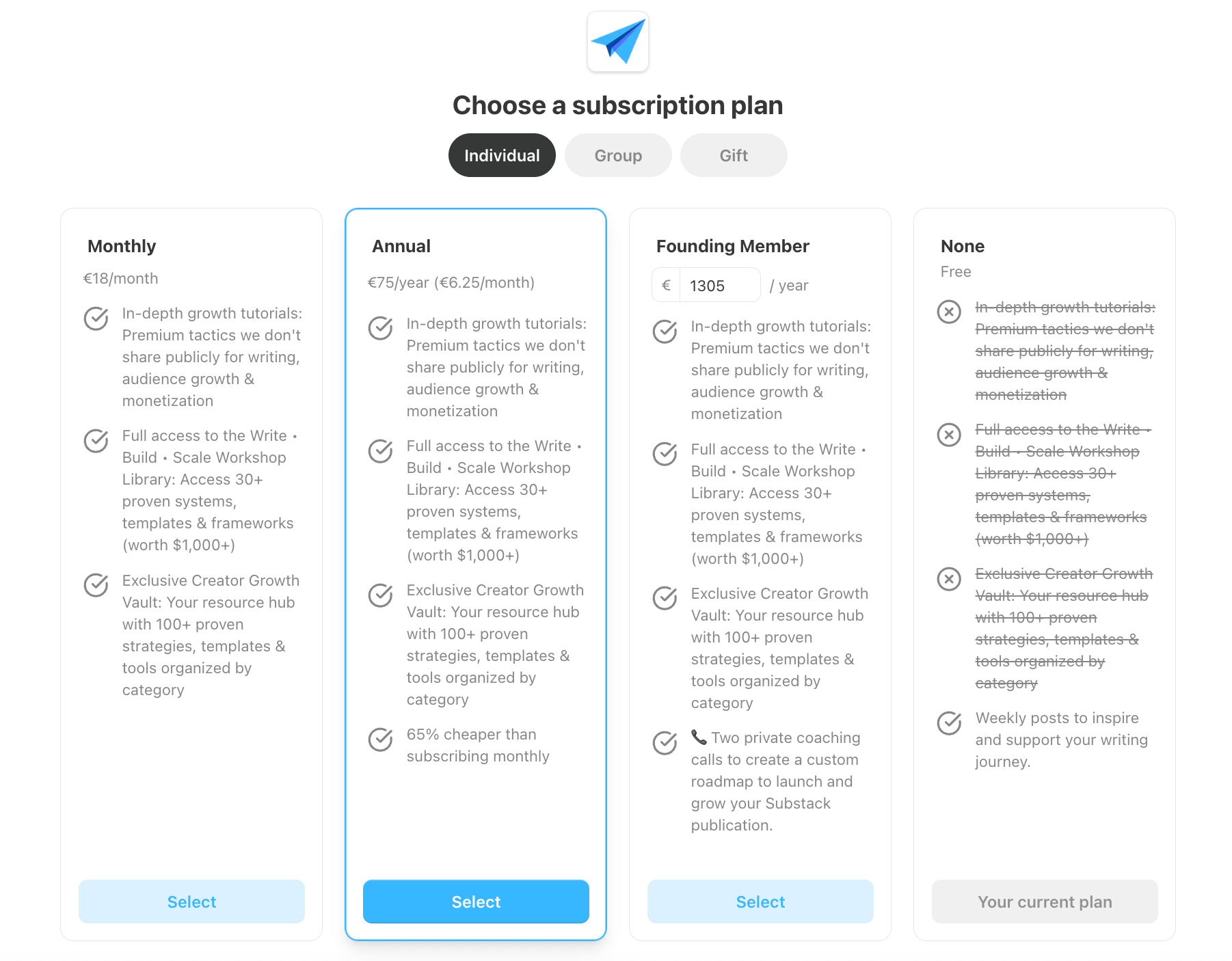
You only have a few bullet points to convince someone to upgrade, which isn’t enough.
That’s why we decided to build a dedicated landing page (our ‘Become a Member’ page) for ourselves.
The good news is, Substack makes this pretty easy to do.
You can create a custom page by going into your Dashboard, going to Settings, navigating to Website, and clicking Add Custom Page.
That’s where you can build a dedicated ‘Become a Member’ page from scratch.
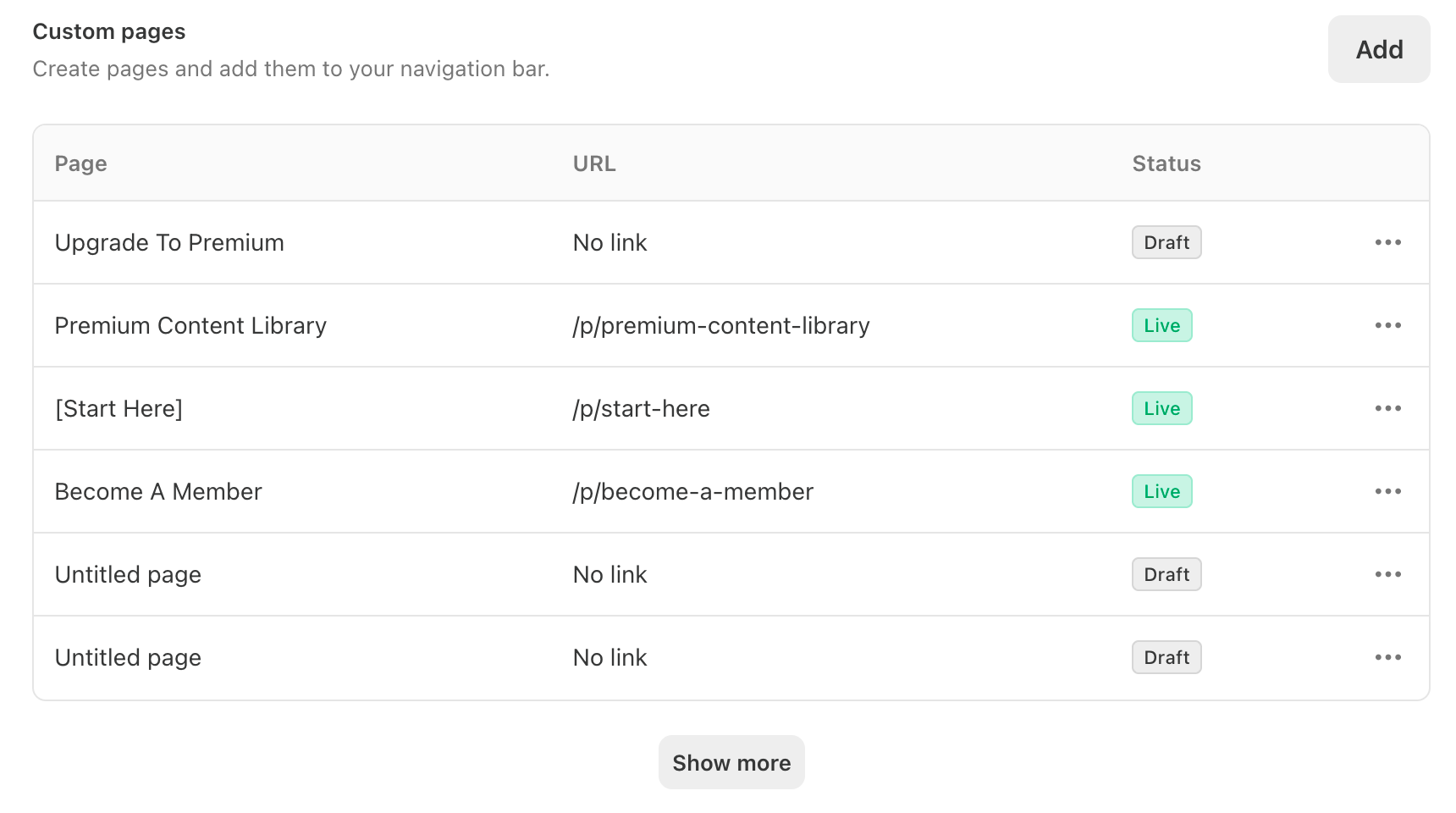
Here’s what to include on your ‘Become a Member’ page:
A clear breakdown of what’s included
Don’t make people guess what they’re paying for. Be specific about every resource, article, course, or perk they unlock as a paid subscriber.
Tangible, specific benefits
Skip the vague promises. Instead of “exclusive content,” say something like “save hours each week with done-for-you templates and step-by-step guides.”
Testimonials from existing paid subscribers
A few honest quotes from real members will do more for your conversions than any sales copy you write yourself.
A free vs. paid comparison
Help readers see exactly what they currently have access to — and what they’re missing. That contrast alone is often enough to push someone from free to paid.
Once the page is live, add it to your navigation bar so your subscriber will find it organically.
On top of that, link to it regularly from your free posts whenever you mention your premium Substack.
By setting up your ‘Become a Member’ page, you’re creating a much stronger marketing asset that does a big part of the selling for you.
Live Masterclass: Grow Your Audience & Income on Substack

We’re hosting a LIVE Substack Masterclass next Thursday where you’ll learn:
✅ The Visibility Shift — The one thing separating fast-growing Substack creators from those who post for months and get nowhere
✅ The Ecosystem Approach — The 3-part system behind every fast-growing Substack, and why posting more content will never be the answer
✅ The System Advantage — The exact system behind hitting Bestseller status and your first paid subscribers — faster than you think is possible
#2: Use Simple “Content Funnels”
A content funnel sounds more complicated than it is. Here’s the basic idea: You write a free post that delivers real value on a topic your audience cares about.
At the end of that post — or somewhere within it — you link to a related premium post that goes even deeper on the subject.
This should be a natural next step for anyone who found the free post useful.
When a reader clicks through to that premium post, here’s where a lot of creators make a mistake: they lock the entire post behind the paywall.
The reader hits a wall before they’ve read a single word, with no sense of what they’re actually paying for.
A much more effective approach is to place your paywall manually — halfway through the article, for example.
You can choose exactly where the paywall appears when you’re in the post editor by clicking on More and selecting Paywall (see the image below for context).
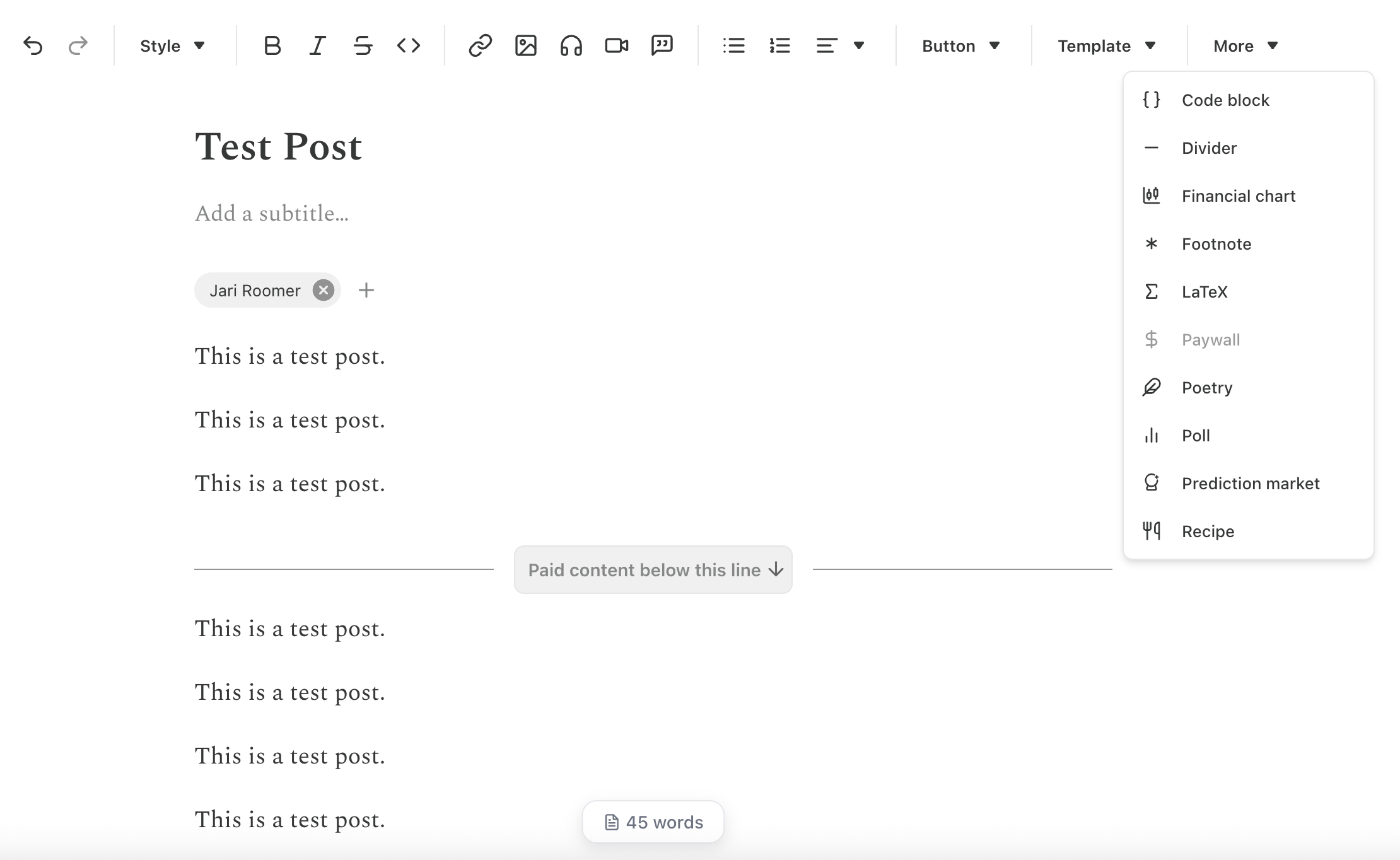
This way, your reader gets a genuine taste of your premium content.
They read the first half, find it valuable, and then hit the paywall right at the point where they want more.
Now they’re not just being asked to pay — they already know the content is worth it, because they’ve experienced it firsthand.
This removes one of the biggest barriers to upgrading: uncertainty.
People don’t want to pay for something they’ve never experienced. Placing your paywall somewhere strategically solves that.
They get enough to see the quality, and just enough to want the rest.
But by setting up simple content funnels, you turn your free posts into revenue-generating assets.
Simply by linking to a premium post — one that goes even deeper on the subject, for example — you’ll get more people to upgrade organically.
#3: Create a “Premium Content Library”
Our ‘Premium Content Library’ is one of the most profitable pages on our entire Substack.
It’s a dedicated page on your Substack where all of your paid content lives in one place — organized, easy to browse, and immediately visible to anyone who lands on it.
When a free subscriber finds their way to your content library and sees everything that’s already waiting for them — guides, workshops, templates, deep-dive articles, course materials — the sales argument makes itself.
You don’t have to say “Upgrade now, and you’ll get future exclusive resources.” You can say: “Join today and you unlock all of this, right now.”
That’s a fundamentally more compelling offer. It’s not a promise of future value — it’s immediate, tangible, and visible.
Here’s how to set up your Premium Content Library:
Create a custom page on your Substack (using the same Dashboard > Settings > Website > Add Custom Page flow mentioned earlier).
Give it a clear title (like ‘Premium Content Library’) and a short intro explaining what paid subscribers get access to.
Organize your content into clear categories — for example, courses and workshops, in-depth guides, and templates or tools.
The more organized and substantial it looks, the more valuable it feels.
Add it to your navigation bar, and make a habit of linking to it from your free posts as a natural reference point — not as a promotion, but as a resource.
Just to clarify, make the ‘Premium Content Library’ page itself accessible to everyone (not just paid subscribers) so it becomes a conversion asset.
On the page, link to all your premium resources so that if free subscribers click on any of those premium resources, they hit a paywall.
Make This Your Breakthrough Year on Substack
Substack is growing rapidly, and the creators who take action right now are building audiences and income streams that will pay off for years to come.
That’s why we’re hosting a FREE live training on Thursday, where we’ll share the three secrets that separate creators who struggle from those who grow fast and actually get paid for their work.

This live Masterclass gives you a clear, proven system to grow your Substack, so you can truly build momentum this year.
Some very useful tips here. Especially the first... setting up a stand-alone page to promote tiered upgrade options. Thank you!
Didn't think too much about these, these are fantastic pointers, thank you!